Smart Calendar Hub
Designing an intelligent scheduling system to reduce operational friction and improve appointment management for clinics.

Role: Lead Product Designer I Team: 1 Designer, 1 Product Manager, and 1 Developer I Timeline: 3 months
CONTEXT
Overview
Aesthetic Record is a HIPAA-compliant electronic medical record platform used by approximately 50 clinics to manage provider schedules and book patient appointments.
I led the end-to-end redesign of the AR mobile calendar experience in collaboration with a product manager and two developers. The redesigned feature was shipped and integrated into the live app.
Problem
Across 50 clinics, 3–5 appointment coordinators per location manage an average of 30–50 patients daily. The outdated calendar features made it difficult to compare provider schedules, identify availability, and quickly book appointments.
This resulted in:
Delays in scheduling
Missed appointments
Miscommunication between staff and providers
Increased administrative burden
Because scheduling is a core operational workflow, inefficiencies directly impact clinic productivity and patient retention.
CONTEXT
Understanding Goals
Partnered with the Product Manager to define measurable success criteria that would address these workflow gaps and guide decision-making throughout the redesign.
Business Goal: Increase patient acquisition and retention by improving scheduling efficiency across clinics.
User Goal: Enable appointment coordinators to quickly compare provider availability and book patients with minimal friction.
Framing Questions
To anchor the redesign, we aligned on a core question:
“How might we centralize provider availability to enable faster & conflict-free appointment booking?”
This ensured every decision improved visibility, reduced friction, and supported business growth.
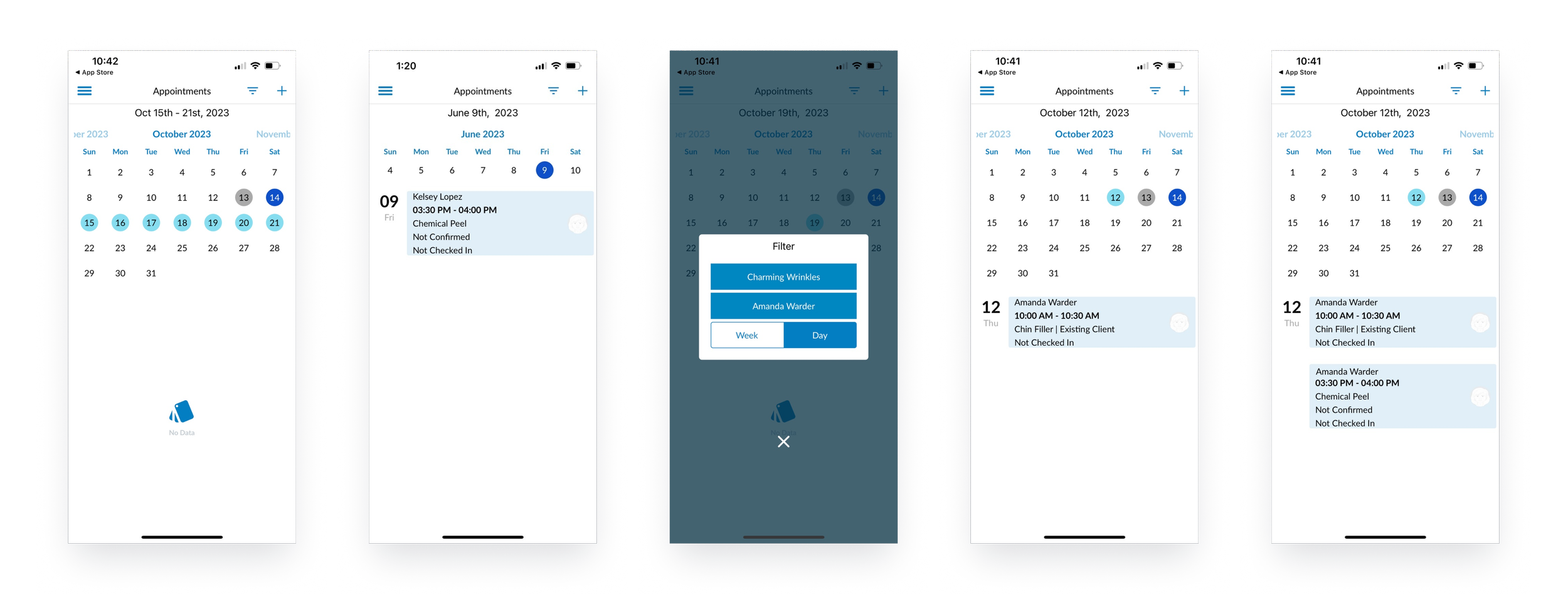
Legacy calendar experience showing fragmented views and limited visibility across providers, contributing to scheduling friction.
RESEARCH
Survey
I created an online survey to quickly collect feedback on the coordinator’s pain points and priorities of booking experiences from various clinics. I received 80 responses from 10 clinics.

Secondary Research
I researched prominent calendar and booking app platforms such as Google Calendar, Outlook Calendar, and Calendly widely utilized by numerous users. I carefully analyzed essential features such as schedule view options and scheduling appointments to add to the AR Calendar.
Interview
I also conducted 10 user interviews with coordinators across different clinics to ask about the overall flow of the calendar features. The main takeaway was:
The calendar feature does not allow the user to view the overall providers’ schedules in an orderly timeline to check- in patients quickly.
Users are not provided with the exact timeline of the day when the provider is available and blocked schedule to book appointments for patients.
Users encounter challenges editing, viewing, and canceling appointments for patients.
SYNTHESIS
Main Key Insights
Through our workshop, survey, secondary research, and interviews I covered a range of pain points and needs that the coordinators experienced with AR calendar features in several key findings.
Different Options to View Schedule - Users want to see the providers' schedules in different formats to easily check each provider's availability and find any conflicts or empty slots to book appointments.
Customization Providers - Users require a system where they can easily filter and compare schedules of multiple providers to book appointments.
Centralized Booking System- Users should have a centralized booking system with different features that help staff to easily edit, delete, and view existing appointments.
Persona

IDEATION
Feature Ideation
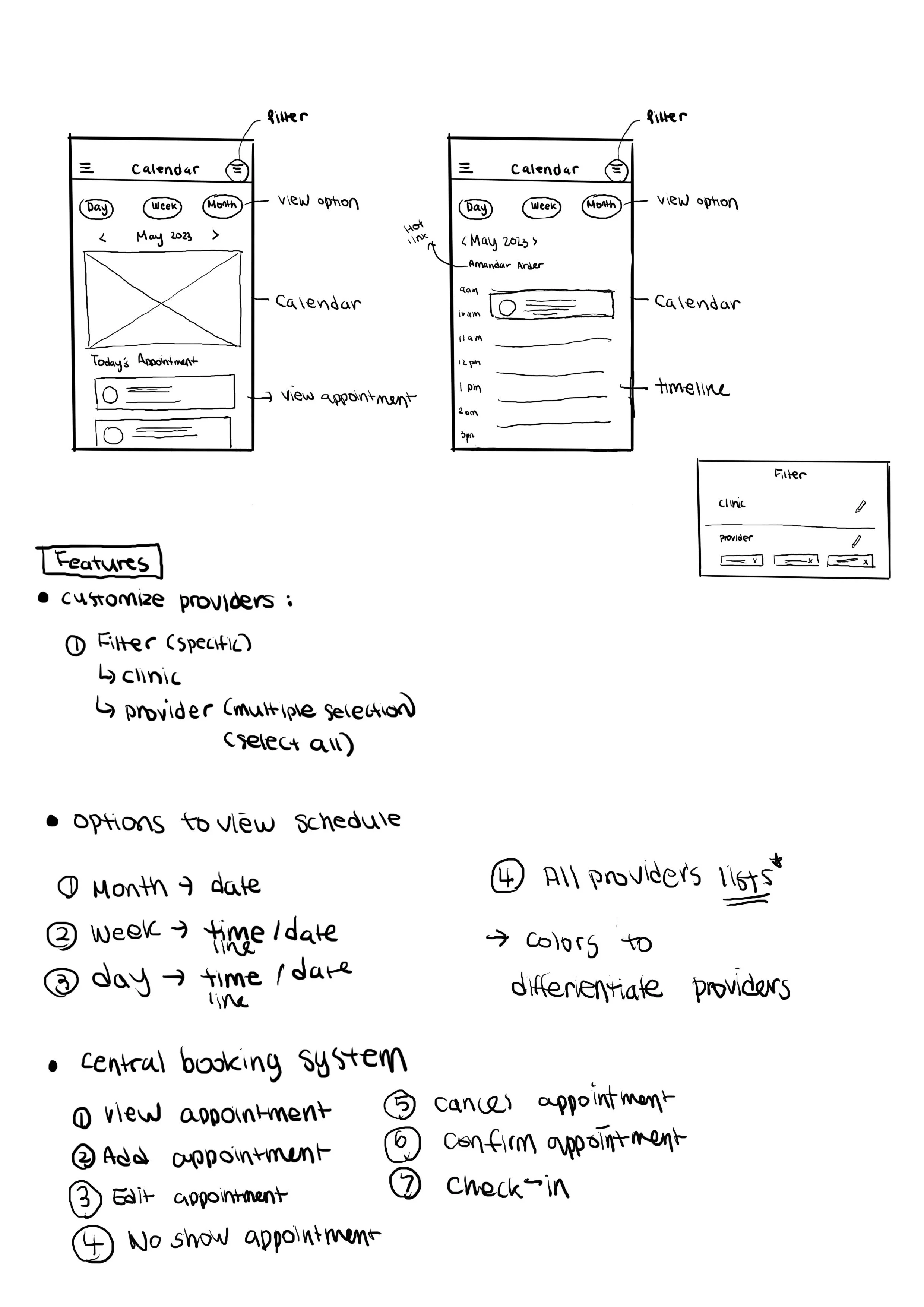
After several discussions with the product manager and developers, I created a concept to organize the calendar screen based on key insights.
First, we decided to include multiple viewing options such as a day, week, month, and list view of all providers with a timeline table, offering various navigation to view the provider's schedule and availability.
Second, we wanted to integrate an advanced filtering system that allows coordinators to select multiple providers to view schedules. This functionality aims to compare the schedules of multiple providers, making it smooth to find the next available provider for patients to receive medical treatment.
Lastly, we aimed to create a booking system with additional features to ensure flexibility in editing appointments for coordinators.
High to Low Priority
After identifying potential calendar features, our team used a prioritization matrix to establish a hierarchy of high-to-low-priority features to inform the user flow.

User Flow
We focused on organizing how users navigate through the features based on a priority matrix. We first tackled the user flow for the day view feature. Since the flow for the week and month views were similar, we concentrated on improving the process for the day view specifically.

DESIGN
Wireframes
I developed wireframes based on our ideation sessions and presented them to gather feedback from the Chief Growth Officer (CGO), the product manager, and our developers. After receiving feedback, I started to iterate on the designs.

Mid-Fidelity
During the mid-fidelity prototype process, I interacted with the coordinator to test the product. This process involved adding, deleting, re-arranging, and re-creating features. I also worked on a design system based on AR branding and marketing.

IMPROVEMENT
User Testing
Before finalizing the product, I conducted usability testing by giving out tasks to 6 coordinators to ensure the success of user experience. The goals of usability testing were to understand the flow of the overall app, uncover problems,and navigate to complete tasks.
Testing Result
95% completed the task of clicking different calendar views, comparing schedules, filtering providers and editing appointments.
However, 60% of users failed to locate the list of all provider’s schedules for the day.
50% of users commented that they found the filtering process to betoo complicated due to the number of screens to click and exit.
Improvements
From user testing sessions, I reviewed the filter system and icons and made the following adjustments:
Simplify the steps of the filter system by eliminating the need for multiple screens and an exit button to apply filters
Introduce new, intuitive icons that make it effortless for users to find the providers' list view and apply filters
Simplified Filter System

Comprehensive Icons

SOLUTION
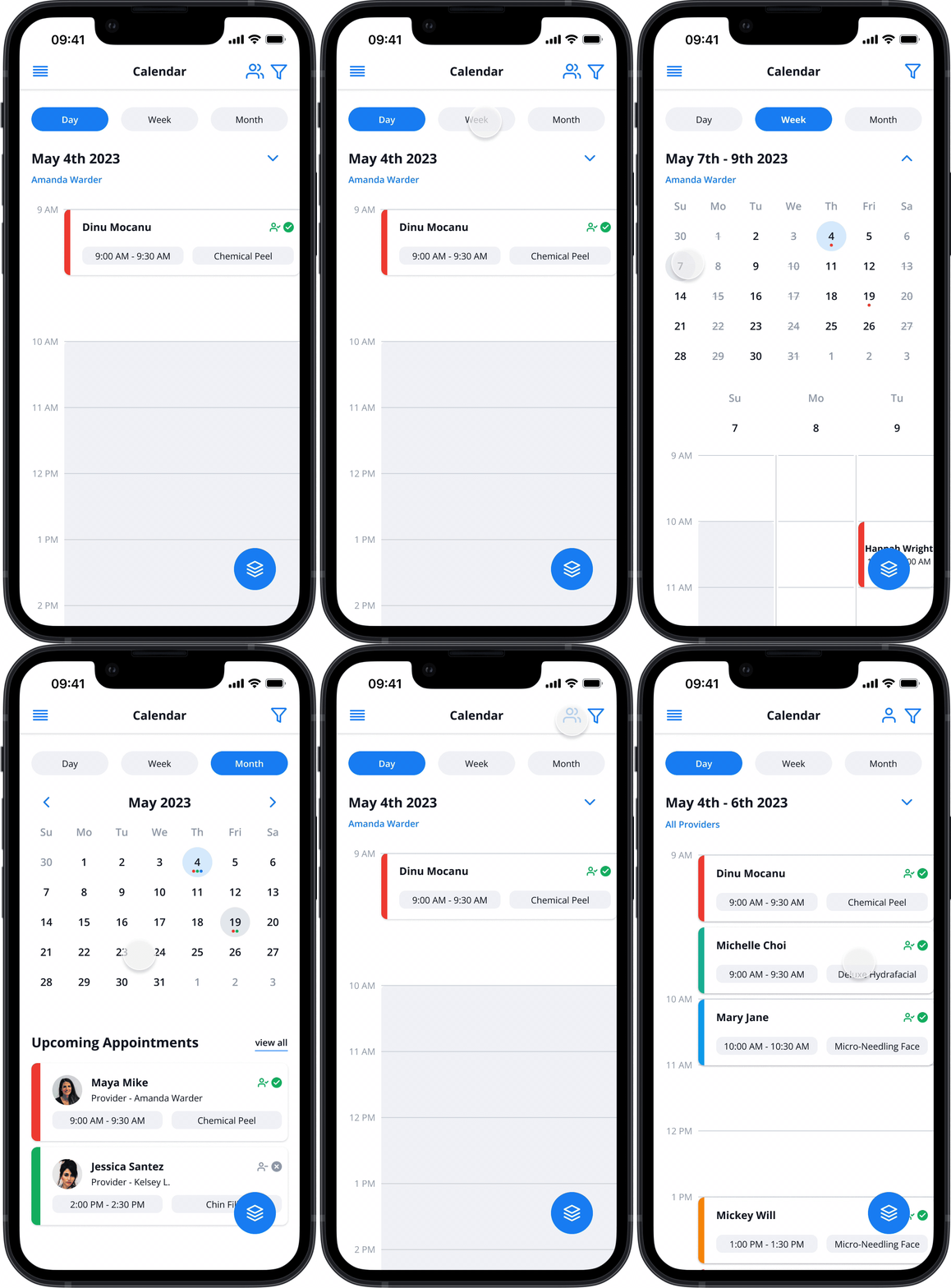
Calendar View Options
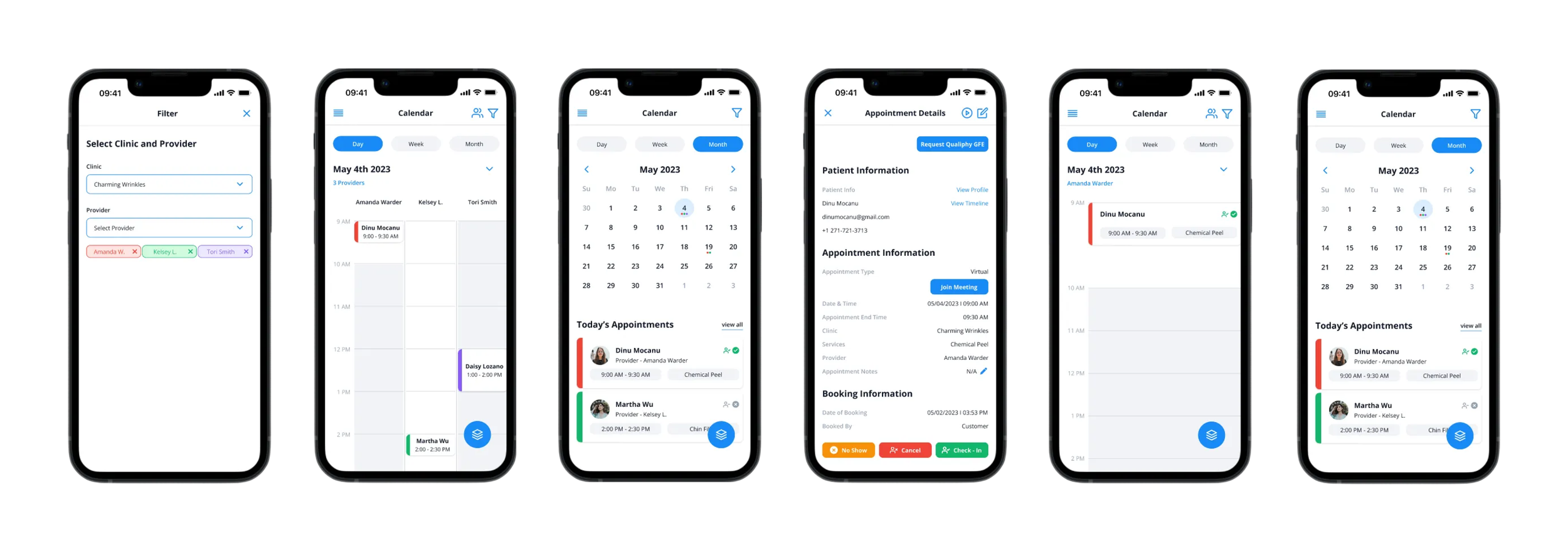
Choose from various options to view providers' appointments on the calendar, including daily, weekly, monthly, and a comprehensive list of all providers.
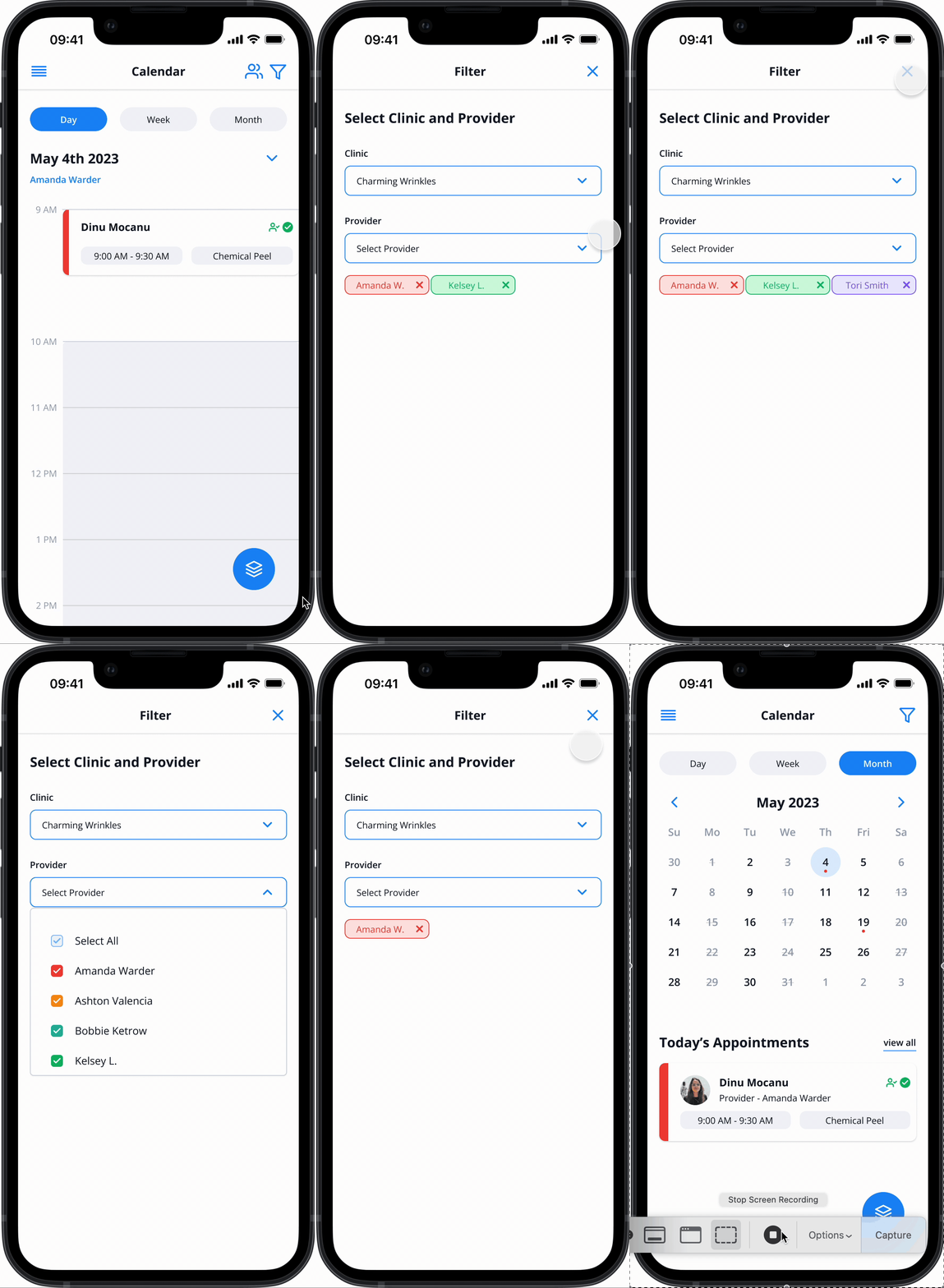
Advanced Filter System & Hotlink
View of multiple providers' schedules to suit users’ preferences using the advanced filtering system and quick hotlinks.
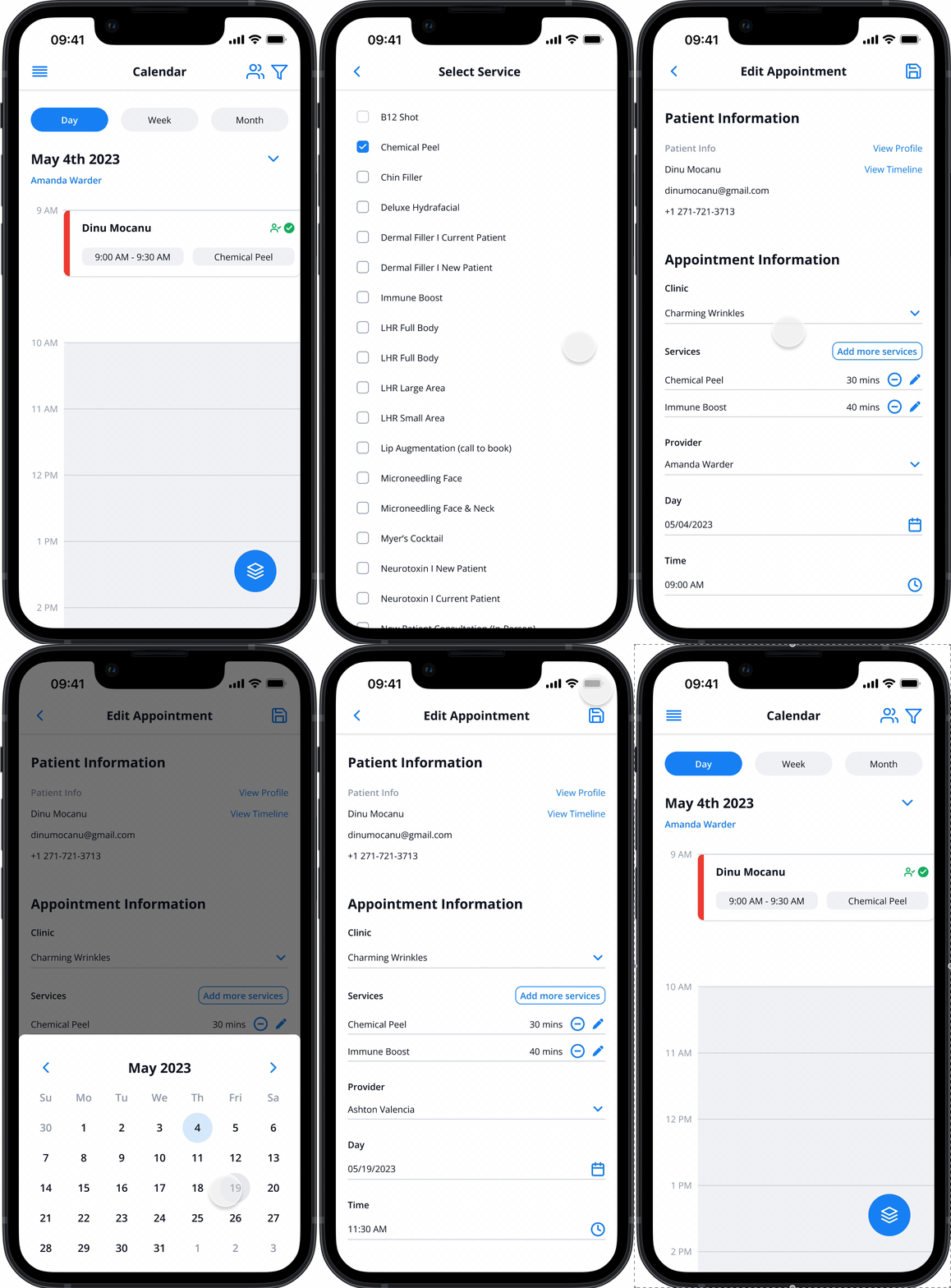
Streamlined Booking System
A single destination for adding, viewing, and editing patients’ appointments with additional features
FINAL DESIGN
Final Product
🎉 Outcomes
The final design product increased by a total of 25% of new patients in 83 days across 14 clinics. Also, our team received survey results from 46 appointment coordinators providing feedback on the improved ‘Calendar,' resulting in a great rating of 4.3 out of 5.
Awards
Recently, Smart Calendar Hub has won several international awards through a competitive design competition.
Muse Awards I Design Master Prize I Creative Communication Awards I International Design Awards
After Thoughts
The newly redesigned AR calendar is now live on the Apple App Store. The response has been positive across clinics, and it’s another project I’m proud to have contributed to—now available for download on the App Store.